It was 2 AM on a Wednesday when I got the text.
"Hey Gautam, our website is showing a 'domain expired' page. Clients are seeing this. Can you fix it ASAP?"
My stomach dropped. I scrambled to my laptop, logged into GoDaddy, and sure enough — the domain had expired 3 days ago. The auto-renewal had failed because the card on file had expired. I renewed it manually, waited for DNS propagation, and spent the next hour apologizing to my client.
Total cost of that incident:
- ₹1,200 for the renewal (with the "expired domain surcharge").
- 3 hours of my time (at 2 AM).
- An immeasurable amount of client trust.
This was the incident that made me build the Digital Asset Manager in RunoSO. And if you're a freelancer, creator, or solopreneur managing any kind of digital presence, this guide is for you.
The Digital Asset Problem
Here's a typical solo operator's digital footprint:
- 5–20 domains across GoDaddy, Namecheap, Google Domains (now Squarespace), and Cloudflare.
- 2–5 hosting servers on DigitalOcean, Hetzner, AWS, or Vercel.
- 10–30 SaaS subscriptions — some monthly, some annual, some you forgot about.
- Multiple social media accounts — personal, client-managed, brand accounts.
- A dozen GitHub repositories — some active, some archived, some you can't remember why they exist.
Now ask yourself: Do you know when every single one of these expires or renews?
If you're like most solo operators, the answer is no. You find out when something breaks, when a charge appears on your bank statement, or when a client emails you at 2 AM.
The Spreadsheet Trap
The instinct is to create a spreadsheet. "I'll just make a Google Sheet with all my domains and their expiry dates."
I tried this. Here's what happened:
- Month 1: Created a beautiful spreadsheet with columns for Domain, Registrar, Expiry Date, Auto-Renewal, and Notes. Felt productive.
- Month 3: Bought two new domains. Forgot to add them to the sheet.
- Month 5: A hosting renewal came up that wasn't in the sheet because I only tracked domains, not hosting.
- Month 7: Stopped checking the sheet entirely because it was outdated.
Spreadsheets work for static data. Digital assets are dynamic. They're registered, transferred, upgraded, expired, renewed, and cancelled constantly. A tracking system needs to be part of your daily workflow — not a separate file you open once a quarter.
What You Actually Need to Track
Let me break down the six categories of digital assets every solo operator should be monitoring:
1. Domains
| Field | Why It Matters |
|---|---|
| Domain name | Obviously |
| Registrar | GoDaddy, Namecheap, Cloudflare — you need to know where to log in |
| Expiry date | The one date you can't afford to miss |
| Auto-renewal status | Is it on? Is the payment method valid? |
| DNS provider | Is it the same as the registrar or delegated to Cloudflare? |
| Linked project/client | Whose domain is this? |
2. Hosting & Servers
| Field | Why It Matters |
|---|---|
| Provider | DigitalOcean, Hetzner, AWS, Vercel |
| Server IP | For SSH access and DNS configuration |
| Plan & specs | So you know when to upgrade |
| Monthly cost | For expense tracking and client billing |
| Renewal/billing date | When the charge hits |
3. Cloudflare Zones
| Field | Why It Matters |
|---|---|
| Zone name | Usually matches the domain |
| Plan type | Free, Pro, Business? |
| Linked domain | Which domain is this zone managing? |
| SSL status | Full, Flexible, or Off? |
4. GitHub Repositories
| Field | Why It Matters |
|---|---|
| Repo name & URL | Quick access |
| Tech stack | So you remember what's inside |
| Visibility | Public or Private? |
| Linked project | Which project does this repo belong to? |
5. Social Media Accounts
| Field | Why It Matters |
|---|---|
| Platform | Twitter/X, Instagram, LinkedIn, YouTube |
| Handle/URL | Quick access |
| Account owner | Is this your account or a client's? |
| Follower count | Track growth over time |
| Linked credentials | Password stored in the Vault? |
6. SaaS Subscriptions
| Field | Why It Matters |
|---|---|
| Tool name | Figma, Vercel, Notion, etc. |
| Billing cycle | Monthly or Annual? |
| Cost per cycle | For budgeting |
| Renewal date | So you can cancel before auto-renewal |
| Is it actually being used? | The most important question |
The "Subscription Zombie" Problem
Here's a stat that should scare you: the average solo professional pays for 3–5 SaaS tools they don't actively use.
These are "subscription zombies" — tools you signed up for during a burst of productivity, used for two weeks, forgot about, and now pay for every month. $10 here, $15 there. Over a year, that's $300–$600 silently draining from your account.
Without a centralized view of every subscription, its cost, and its last-used date, these zombies thrive in the shadows of your bank statement.
Building Your Digital Asset Control Room
Here's the system I built in RunoSO, and how I recommend setting it up:
Step 1: The Great Asset Audit
Block 2 hours on your calendar. Open every browser tab you need:
- Every domain registrar you use (GoDaddy, Namecheap, Cloudflare, etc.)
- Your hosting providers (DigitalOcean, AWS, Vercel)
- Your bank statements for the last 3 months (to find zombie subscriptions)
- Your password manager (to find accounts you forgot about)
Log every single asset. Yes, it's tedious. Yes, it's worth it. You'll likely discover:
- A domain you forgot about that's about to expire.
- A $12/month tool you haven't logged into since January.
- A hosting server running a test project that could be shut down.
Step 2: Set Up Renewal Awareness
For each asset with a renewal date, note:
- When it renews.
- Whether auto-renewal is on.
- Whether the payment method is current.
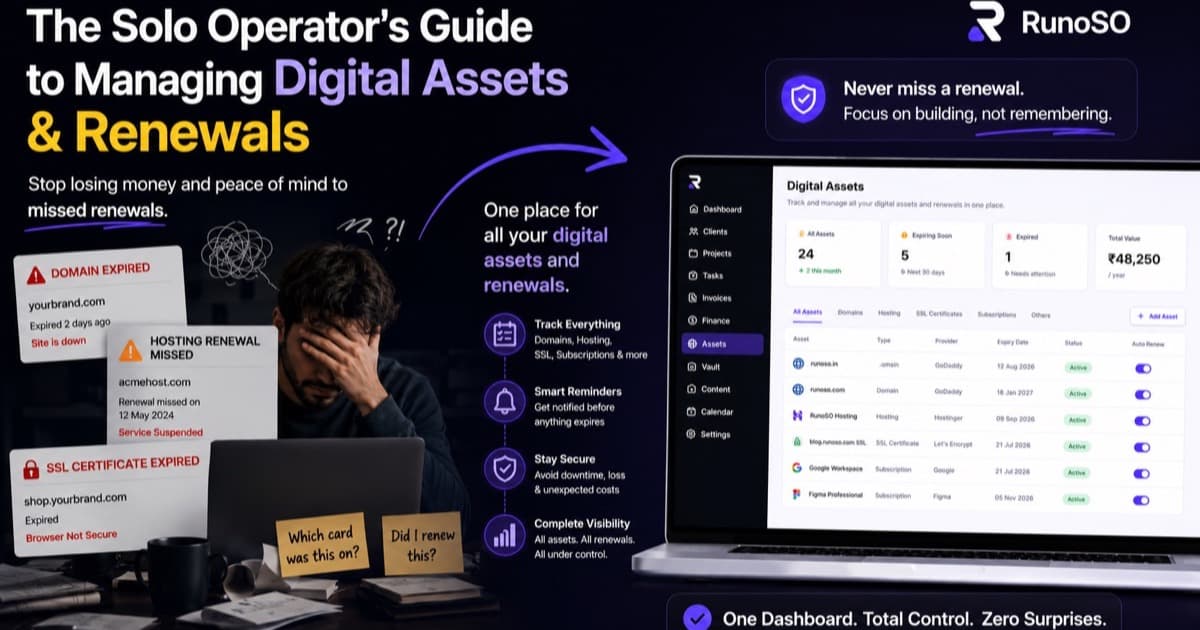
In RunoSO, the Asset Manager displays expiry dates prominently. You can sort by "expiring soon" to see what needs attention this month.
Step 3: Link Assets to Clients and Projects
This is where a centralized system shines. Instead of wondering "whose domain is this?", every asset links to a client and/or project. When you open a client's page, you see:
- Their projects.
- Their invoices.
- Their vault credentials.
- Their domains, hosting, and social accounts.
Everything in context. No hunting.
Step 4: Monthly Review Ritual
Set a recurring 30-minute calendar event: "Digital Asset Review." Every month, open your asset dashboard and check:
- Any renewals in the next 30 days? Are payment methods valid?
- Any subscriptions I can cancel? If you haven't used a tool in 60 days, it's a zombie.
- Any new assets to add? New domains, new repos, new tools.
This ritual, combined with a centralized tracker, is how you go from "2 AM domain panic" to "zero surprises."
The ROI of Asset Tracking
Here's my personal before-and-after:
| Metric | Before (Spreadsheet/Nothing) | After (Centralized Tracker) |
|---|---|---|
| Missed domain renewals | 2–3 per year | 0 |
| Zombie subscriptions found | 0 (didn't look) | 4 (saved ~₹36,000/year) |
| Time to find a domain's registrar | 5–10 min (checking email confirmations) | 5 seconds |
| Client asset handoff time | 30+ min of gathering links | 2 minutes (everything on their page) |
| 2 AM panic incidents | ~quarterly | None |
The savings from killing zombie subscriptions alone paid for the time I spent building the tracker. The peace of mind from never missing a renewal is priceless.
Quick Wins You Can Do Today
Even if you're not using RunoSO, here are three things you can do right now:
1. Check Your Domain Expiry Dates
Log into every registrar you use. Sort by expiry date. If anything expires in the next 60 days, renew it now or confirm auto-renewal is active with a valid payment method.
2. Audit Your Subscriptions
Open your bank statement. Search for recurring charges. Make a list. Cancel anything you haven't used in 60 days.
3. Centralize Your Server Credentials
If you have server IPs, SSH keys, and database URLs scattered across text files and Slack DMs, consolidate them now. Use an encrypted vault — not a Google Doc.
RunoSO's Digital Asset Manager tracks domains, hosting, Cloudflare zones, GitHub repos, social accounts, and SaaS subscriptions — all linked to your clients and projects.
Next in this series: "How to Build a Content Pipeline That Actually Gets Published."
Follow the journey on X (Twitter).
Keep Reading
- Track finances alongside renewals: 8 metrics every solo business needs.
- Stop tool sprawl: best productivity tools honest review.
- Full OS: features overview.