If you're a freelancer or agency managing multiple clients, you're probably storing their server passwords, API keys, and database credentials somewhere. And if we're being honest, that "somewhere" is probably one of these:
- A
.txtfile on your desktop calledpasswords.txt. - A Notion page with "hidden" toggle blocks.
- A Slack DM to yourself.
- A shared Google Doc titled "Client Credentials (DO NOT SHARE)."
None of these are encrypted. None of them have access controls. And any one of them, if compromised, could give an attacker root access to your client's entire infrastructure.
I know, because I was doing exactly this.
When I built RunoSO, the credentials Vault was the feature I cared about most deeply. This article is a full technical breakdown of how I designed and implemented it.
The Threat Model
Before writing any code, I defined the threat model. What am I protecting against?
- Database breach: If someone dumps the database (SQL injection, leaked backup, compromised hosting), they should get ciphertext — not plaintext credentials.
- Frontend exposure: Sensitive data should never appear in client-side JavaScript bundles, network requests, or browser storage in plaintext unless the user explicitly requests it.
- Internal leaks: Even if a team member has database read access, they shouldn't be able to decrypt vault contents without the master key.
What I'm explicitly not protecting against:
- Compromised server runtime: If an attacker has shell access to the running Node.js process, they can read environment variables (including the master key). This is a deployment security problem, not an application architecture problem.
- Keylogger/screen capture: If the user's device is compromised, no application-level encryption can help.
With this threat model in mind, I chose symmetric encryption with a server-side master key.
Why AES-256 (and Not End-to-End Encryption)
You might wonder: "Why not go full E2EE (end-to-end encryption) where the user holds the key and the server is completely blind?"
I considered it. Here's why I didn't:
| Approach | Pros | Cons |
|---|---|---|
| E2EE (client holds key) | Server-blind. Maximum security. | Key loss = permanent data loss. No server-side search. No key recovery. Complex UX for solo operators. |
| Server-side symmetric (AES-256) | Simple UX. Server can decrypt when needed. Master key managed via env vars. | Master key compromise = full vault exposure. |
For RunoSO's target audience — solo freelancers and small agencies — the UX tradeoff of E2EE was too high. If a user forgets their encryption passphrase, their entire vault is permanently unrecoverable. For a productivity tool, that's unacceptable.
Instead, I went with AES-256-CBC via CryptoJS, with the master key stored as a server-side environment variable (VAULT_MASTER_KEY). This provides:
- ✅ Strong encryption at rest (database-level protection).
- ✅ Simple UX (user never manages keys).
- ✅ Server-side decryption on demand.
- ✅ No risk of user-caused permanent data loss.
The Architecture
Here's the high-level flow:
┌─────────────┐     ┌──────────────────┐     ┌─────────────────┐
│  Frontend   │────▶│  API Route       │────▶│  PostgreSQL     │
│  (React)    │     │  (Next.js)       │     │  (Neon DB)      │
│             │     │                  │     │                 │
│  Plaintext  │     │  Encrypt w/      │     │  Stores only    │
│  input form │     │  VAULT_MASTER_KEY │     │  ciphertext     │
│             │     │  before INSERT   │     │                 │
│  Displays   │◀────│  Decrypt w/      │◀────│  Returns        │
│  plaintext  │     │  VAULT_MASTER_KEY │     │  ciphertext     │
│  on request │     │  after SELECT    │     │                 │
└─────────────┘     └──────────────────┘     └─────────────────┘
Key principle: Plaintext never exists in the database. It only exists in two places:
- Briefly in the API route's memory during encrypt/decrypt operations.
- In the browser, displayed to the user.
The Encryption Layer
I created a utility module at src/lib/vault/ that wraps CryptoJS:
// src/lib/vault/encryption.ts
import CryptoJS from 'crypto-js';

const MASTER_KEY = process.env.VAULT_MASTER_KEY!;

/**
 * Encrypt a plaintext string using AES-256-CBC.
 * Returns a base64-encoded ciphertext string.
 */
export function encryptVaultItem(plaintext: string): string {
  if (!MASTER_KEY) {
    throw new Error('VAULT_MASTER_KEY is not configured');
  }
  return CryptoJS.AES.encrypt(plaintext, MASTER_KEY).toString();
}

/**
 * Decrypt a ciphertext string back to plaintext.
 * Throws if the master key is wrong or data is corrupted.
 */
export function decryptVaultItem(ciphertext: string): string {
  if (!MASTER_KEY) {
    throw new Error('VAULT_MASTER_KEY is not configured');
  }
  const bytes = CryptoJS.AES.decrypt(ciphertext, MASTER_KEY);
  const decrypted = bytes.toString(CryptoJS.enc.Utf8);

  if (!decrypted) {
    throw new Error('Decryption failed — invalid key or corrupted data');
  }

  return decrypted;
}
How CryptoJS AES Works Under the Hood
When you call CryptoJS.AES.encrypt(plaintext, passphrase), here's what actually happens:
- Key Derivation: CryptoJS uses PBKDF2-like key derivation (specifically, OpenSSL's
EVP_BytesToKey) to derive a 256-bit key and a 128-bit IV from your passphrase string. - Random Salt: A random 8-byte salt is generated for each encryption operation, making identical plaintexts produce different ciphertexts.
- AES-256-CBC: The plaintext is encrypted using AES in CBC (Cipher Block Chaining) mode with PKCS7 padding.
- Output Format: The result is an OpenSSL-compatible string:
Salted__+ 8-byte salt + ciphertext, all base64-encoded.
This means:
- ✅ Each encryption is unique (random salt).
- ✅ The same credential encrypted twice produces different ciphertexts.
- ✅ Standard format, compatible with OpenSSL CLI for verification.
The Database Schema
The vault items are stored in a vault_items table, managed by Drizzle ORM:
// In the Drizzle schema
export const vaultItems = pgTable('vault_items', {
  id: text('id').primaryKey().$defaultFn(() => nanoid()),
  userId: text('user_id').notNull().references(() => users.id),
  name: text('name').notNull(),              // "AWS Production API Key"
  category: text('category').notNull(),       // "passwords" | "servers" | "api_keys" | "other"
  encryptedValue: text('encrypted_value').notNull(), // AES-256 ciphertext
  notes: text('notes'),                       // Optional plaintext notes
  url: text('url'),                           // Associated URL
  clientId: text('client_id').references(() => clients.id),
  projectId: text('project_id').references(() => projects.id),
  createdAt: timestamp('created_at').defaultNow(),
  updatedAt: timestamp('updated_at').defaultNow(),
});
Notice:
encryptedValuestores the AES ciphertext. This is the only encrypted column.name,category, andnotesare stored in plaintext — they're metadata, not secrets.clientIdandprojectIdlink credentials to specific clients/projects for contextual access.
Why Not Encrypt Everything?
I made a deliberate decision to only encrypt the value field (the actual password/key/credential). Here's why:
- Searchability: If
nameandcategorywere encrypted, I couldn't filter vault items by category or search by name without decrypting every row. That's O(n) decryption on every query — terrible for UX and performance. - Metadata vs. Secrets: Knowing that a vault item is named "AWS Production Key" and categorized as "API Keys" is far less sensitive than knowing the actual key value
AKIA3EXAMPLE.... - Pragmatic security: In the threat model, the attacker who has database access sees item names but not their values. That's a massive reduction in blast radius.
The API Layer
Creating a Vault Item
// POST /api/vault
export async function POST(request: Request) {
  const session = await auth();
  if (!session?.user?.id) {
    return NextResponse.json({ error: 'Unauthorized' }, { status: 401 });
  }

  const body = await request.json();
  const { name, category, value, notes, url, clientId, projectId } = body;

  // Encrypt the sensitive value before storing
  const encryptedValue = encryptVaultItem(value);

  const [item] = await db.insert(vaultItems).values({
    userId: session.user.id,
    name,
    category,
    encryptedValue,  // Only ciphertext hits the database
    notes,
    url,
    clientId,
    projectId,
  }).returning();

  // Return the item WITHOUT the decrypted value
  return NextResponse.json({
    ...item,
    value: undefined,  // Never return the plaintext in list views
  });
}
Reading a Vault Item
// GET /api/vault/[id]
export async function GET(
  request: Request,
  { params }: { params: { id: string } }
) {
  const session = await auth();
  if (!session?.user?.id) {
    return NextResponse.json({ error: 'Unauthorized' }, { status: 401 });
  }

  const item = await db.query.vaultItems.findFirst({
    where: and(
      eq(vaultItems.id, params.id),
      eq(vaultItems.userId, session.user.id)
    ),
  });

  if (!item) {
    return NextResponse.json({ error: 'Not found' }, { status: 404 });
  }

  // Decrypt only when explicitly requested
  const decryptedValue = decryptVaultItem(item.encryptedValue);

  return NextResponse.json({
    ...item,
    value: decryptedValue,
    encryptedValue: undefined,  // Never expose ciphertext to the frontend
  });
}
Key decisions in the API layer:
- List views never decrypt. When fetching all vault items (
GET /api/vault), I return names, categories, and metadata — but never the actual values. Decryption only happens on individual item requests. - Ciphertext is never sent to the frontend. The API returns either the decrypted
value(for detail views) or nothing. The raw ciphertext stays on the server. - User scoping. Every query filters by
userIdto ensure vault isolation between users.
Frontend: The Reveal Pattern
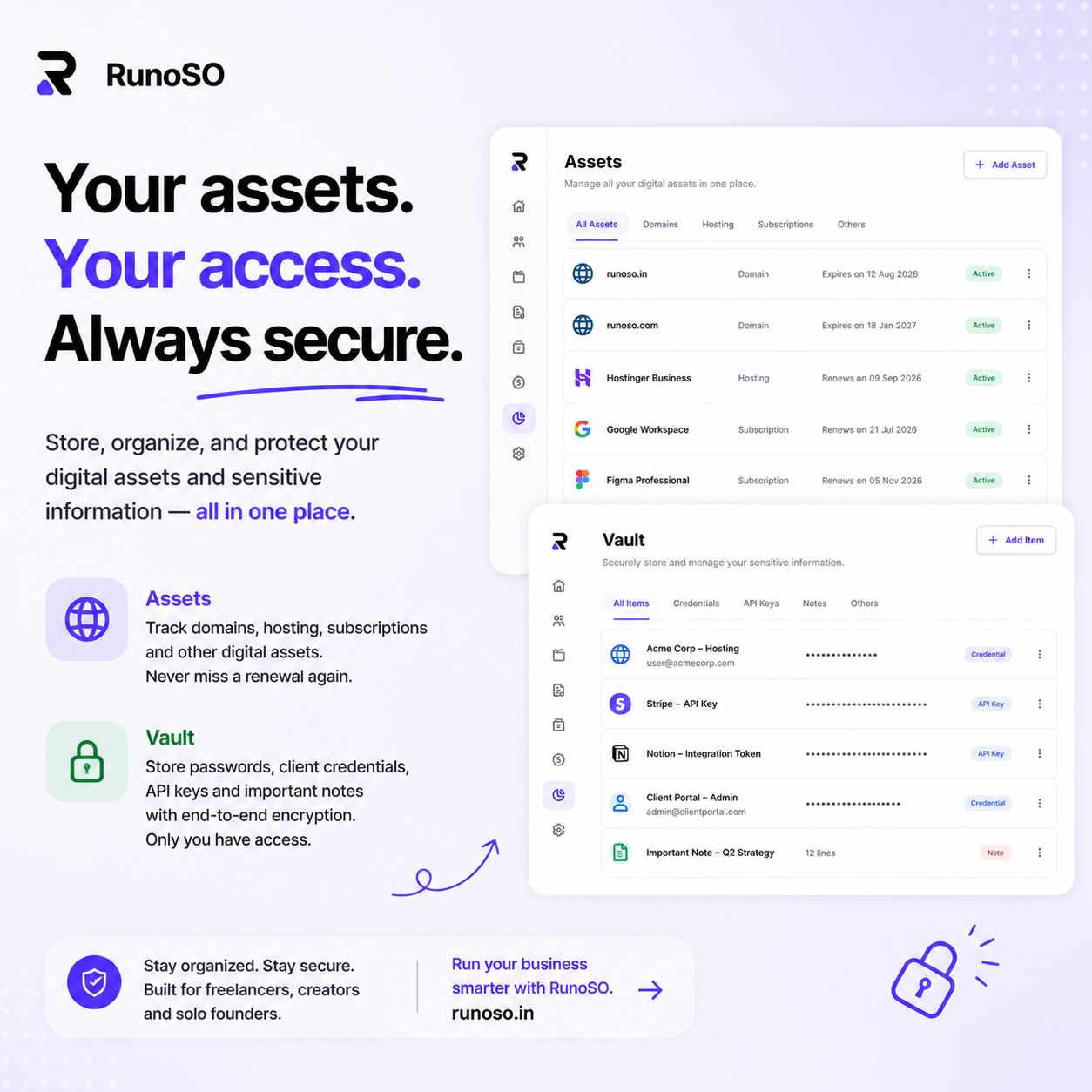
On the frontend, vault items display with the value hidden by default. The user clicks a "Reveal" button to see the actual credential:
┌──────────────────────────────────────────────┐
│  🔑  AWS Production API Key                 │
│  Category: API Keys                          │
│  Client: Acme Corp                           │
│  Value: ••••••••••••••••  [👁 Reveal] [📋]  │
└──────────────────────────────────────────────┘
When "Reveal" is clicked:
- The frontend makes a
GET /api/vault/[id]request. - The API decrypts the value server-side.
- The plaintext is sent over HTTPS and displayed in the browser.
- After 30 seconds (or on page navigation), the value is hidden again.
The "Copy" button copies the value to the clipboard without revealing it visually — useful for quickly pasting credentials without exposing them on screen.
Security Hardening Checklist
Beyond the core encryption, here's what I implemented to harden the Vault:
1. Master Key Management
# .env.local (NEVER committed to Git)
VAULT_MASTER_KEY=a-very-long-random-string-generated-with-openssl-rand-hex-32- The master key is loaded from environment variables at runtime.
- It's never hardcoded, never logged, never included in error messages.
- In production (Vercel), it's set via the dashboard's encrypted environment variables.
2. HTTPS Only
All API routes that handle vault data are served over HTTPS. The decrypted value transits over TLS — never plain HTTP.
3. Session Authentication
Every vault API endpoint checks for a valid NextAuth.js session. Unauthenticated requests get a 401 immediately, before any database query or decryption.
4. No Client-Side Caching
Vault responses include Cache-Control: no-store headers. The browser should never cache decrypted credentials.
5. Database Encryption at Rest
Neon PostgreSQL provides encryption at rest by default. So vault data is double-encrypted: once by AES-256 (application layer) and once by the database's storage encryption.
What I'd Do Differently (Lessons Learned)
1. Consider crypto.subtle Over CryptoJS
CryptoJS is a well-known library, but it's not the most modern choice. The Web Crypto API (crypto.subtle) is built into Node.js and browsers, uses native implementations (faster), and is the recommended approach for new projects.
I chose CryptoJS because it was familiar and had a simpler API. If I were starting from scratch today, I'd use crypto.subtle with explicit AES-256-GCM (which provides authenticated encryption — detecting tampering, not just confidentiality).
2. Add Audit Logging
Currently, there's no log of who accessed which vault item and when. For an agency with multiple team members, this is important. I'd add a vault_access_log table recording:
- Which user accessed which item.
- Timestamp.
- Whether it was a "list" (metadata only) or "reveal" (decrypted) action.
3. Key Rotation Strategy
Right now, rotating VAULT_MASTER_KEY means re-encrypting every vault item. I'd design a key versioning system where each item stores the key version it was encrypted with, allowing gradual migration.
The Takeaway
Building a credentials vault isn't rocket science. The cryptographic primitives are well-established — AES-256 has been battle-tested for decades. The real challenge is in the architecture decisions:
- Where does encryption happen? (Server-side, in our case.)
- What's encrypted vs. what's searchable? (Value only, not metadata.)
- How is the key managed? (Environment variable, never in code.)
- When is decryption triggered? (On explicit user request, never in lists.)
If you're building a SaaS that handles sensitive client data, don't store it in plaintext. It's not hard to add encryption, and the peace of mind — for both you and your users — is immeasurable.
RunoSO's Vault is available as part of the free tier. Store unlimited credentials, organized by client and project, encrypted with AES-256.
Got questions about the implementation? Want to see the full source? Reach out on X (Twitter) — I'm happy to go deeper on any part of this architecture.
Keep Reading
- See the Vault live in RunoSO features and how it links to client management.
- Behind the data model: scalable SaaS database schema.
- Solo operators also need digital asset renewal tracking.