TL;DR: 1Password excels at personal autofill & family sharing for $36/yr. RunoSO Vault excels at client work — AES-256-GCM per-workspace, client/project-linked, 1-click copy, and handover — included in ₹169/mo. Freelancers need both, cleanly separated: 1Password for Netflix, RunoSO Vault for production keys.
Password managers optimize for personal logins and browser autofill; encrypted vaults optimize for client work with context, linking and revocation. This comparison breaks the difference so you stop leaking production keys in Slack.
Tools Compared — Different Jobs
- 1Password: Vaults + Collections + Watchtower + autofill (desktop + browser). Best for personal + family + small team password sharing.
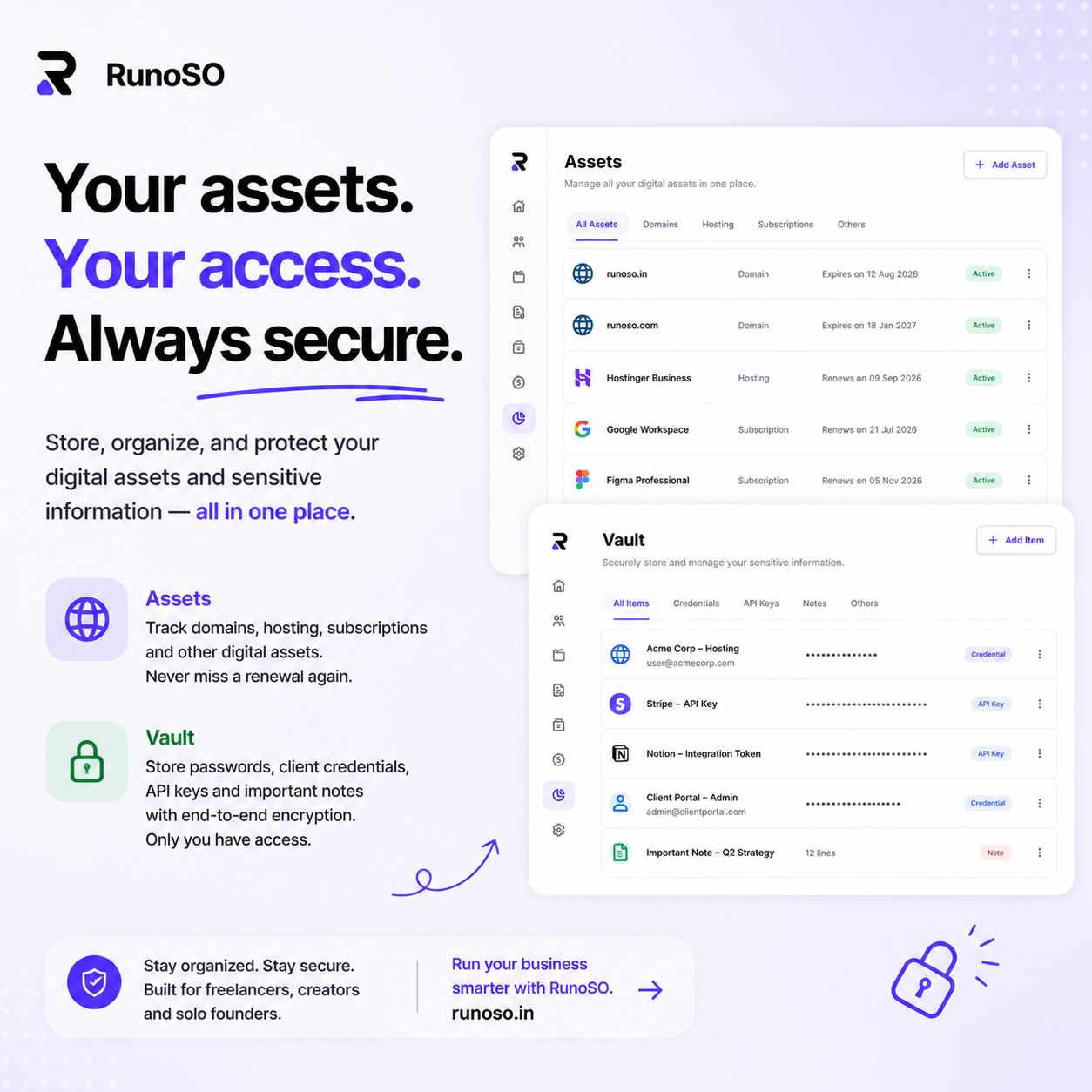
- RunoSO Vault: Business-object vault: every secret links to a client and project, filtered by client, copied in 1 click, rotated on handover. Encryption is AES-256-GCM per-workspace, isolated per tenant — see zero-knowledge vault.
Use manager for personal, vault for business — boundary prevents a client audit exposing your Netflix login.
| Feature | 1Password (Teams) | RunoSO Vault | Winner for freelancers |
|---|---|---|---|
| Encryption | AES-256 + Secret Key | AES-256-GCM + per-workspace isolation | Tie (both strong) |
| Browser autofill | Excellent | Basic (copy-paste) | 1Password |
| Client linking (filter by client) | No (Collections only) | Yes — Acme Corp → 12 secrets | RunoSO |
| Project linking | No | Yes — secret linked to project + invoice | RunoSO |
| Vault per client view | Manual vault | Auto filtered view | RunoSO |
| Handover / revoke on offboarding | Manual move | 1-click handover template + link to invoice close | RunoSO |
| Domain/SSL/hosting context beside secret | No | Yes (assets pane) | RunoSO |
| Audit — who accessed? | Watchtower + activity | Access log per secret (roadmap) | Tie |
| Price | $36/yr ($3/mo) + $20 per guest | Included in Solo ₹169/mo (50 items) / Pro unlimited | RunoSO for bundle |
| Sharing with expiry | Yes (Psst! links) | Portal links rotatable/revocable (Pro) | Tie |
When 1Password Wins (Keep It)
- Personal vault: email, banking, personal SaaS (autofill daily).
- Family plan or need desktop app + Watchtower breached-site alerts.
- You rarely hand over production keys.
Keep personal vault separate from business — don’t mix in one 1Password vault or a client sees your personal tags.
When RunoSO Vault Wins (Switch)
- 5+ clients each with 3-10 secrets (server IP, SSH key, Stripe test key, WP admin).
- You paste keys in Slack/Notion/Sheets today — see where never to store passwords.
- Offboarding: client asks “revoke my access” and you hunt 4 tools.
Workflow: open Acme Corp → see its projects, invoices, and 8 vault items → copy SSH key → paste in terminal → log time. No tab hunt.
Hybrid Setup (Recommended)
- 1Password for
@personalemail + banking (autofill). - RunoSO Vault for
@workclient secrets (linked). - Never copy personal vault item into client vault — keeps audits clean.
Both cost = $36 + ₹2,028 = ~₹5k/yr versus risk of leaked production key ($10k+ incident).
Switch in 20 Minutes
- Export 1Password CSV (or keep as archive).
- In RunoSO → Vault → New → paste secret, select Client → Project, tag
prod/staging. - Test 1-click copy + link to invoice (
Finance → Invoices → Link project). - Document rotation: see store SSH keys + organize hosting creds.
Try the linked vault on RunoSO features — link server → domain → invoice in one click.