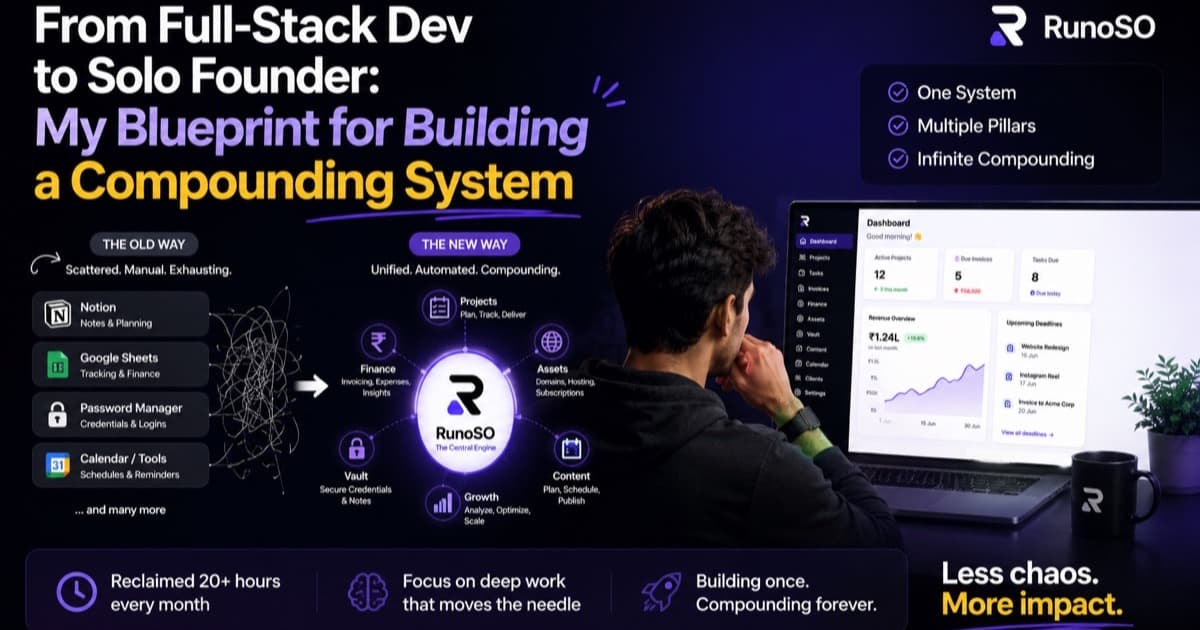
There's a question that haunts every developer who starts freelancing:
"When did I stop being a developer and become an accountant?"
I felt this acutely about eight months into running my own freelance practice. I was spending more time reconciling invoices, tracking payment follow-ups, and updating spreadsheets than I was writing code. And the irony wasn't lost on me — I was building sophisticated applications for clients while running my own business on a patchwork of Google Sheets and Notion tables.
This is the story of how I went from a full-stack developer drowning in admin work to a solo founder with a compounding operating system that runs my entire business.
The Freelancer's Trap
Here's what nobody tells you about going solo: the work itself is the easy part. Building a React dashboard? No problem. Architecting a database schema? I can do that in my sleep.
But then you land your fifth client, and suddenly you're:
- Chasing three pending invoices across different email threads.
- Trying to remember the staging server credentials for a project you handed off two months ago.
- Realizing a client's domain expired yesterday because you forgot to check.
- Wondering if you're actually profitable this quarter, because you haven't reconciled expenses since March.
The freelancer's trap isn't a lack of skill. It's a lack of systems.
Most developers solve this by bolting on more tools. A CRM here, an invoicing app there, a password manager, a project board, a spreadsheet for assets. Before you know it, you're paying $50–100/month and spending 20+ hours in admin overhead.
I chose a different path. I chose to build the system.
The Compounding System Philosophy
Before I wrote a single line of code, I sat down and mapped out every activity I perform to run my business. Not just the daily tasks, but the connections between them:
Client → has Projects → has Tasks → generates Invoices
Client → has Credentials → stored in Vault
Project → has Budget → tracked in Finance
Project → linked to GitHub Repo → tracked in Assets
Content → scheduled for Client → tracked in Pipeline
Domain → linked to Hosting → linked to Cloudflare → tracked in Assets
The key insight was this: In a solo business, everything connects to everything. A client isn't just a row in a CRM — it's the root node of a tree that branches into projects, tasks, invoices, credentials, content, and digital assets.
When you build a system that respects these connections, each module makes every other module more valuable. That's compounding.
Phase 1: The Foundation (Client + Project Management)
I started with the core relationship: Clients and Projects.
In RunoSO, every client has:
- Profile data: Name, company, email, phone, and custom notes.
- Status tracking: Active, Inactive, or Lead — so I always know who's in my pipeline.
- Linked projects: Each with its own type (Dev, Content, Design, Other), budget, advance received, deadline, and GitHub repo link.
This alone eliminated my Google Sheets CRM. But the real power came from what I built next.
Phase 2: Task Management That Actually Motivates
I've used Trello. I've used Linear. I've used Todoist. They all have the same problem for solo operators: they're designed for teams.
When you're the only person on the board, Kanban columns feel like a todo list with extra steps. And there's no dopamine feedback loop — no team celebrating when you move a card to "Done."
So I built two task systems:
Personal Tasks
A simple, clean daily checklist. Every morning, I see my "Today" tasks and a "Backlog" queue. I drag what I want to tackle today, and I work through the list. No columns. No swimlanes. Just a focused, linear workflow.
Project Tasks
For client work, I use a Kanban-style board with three columns: Todo → In Progress → Done. Each task has a priority level (Low, Medium, High) and links back to its parent project.
The Secret Weapon: Task Streaks
Here's what made the difference. I added a simple streak tracker that counts consecutive days where I complete all my daily tasks. It shows:
- 🔥 Current streak
- 🏆 Longest streak
- ✅ Total tasks completed
It sounds simple — almost gimmicky. But after three months, I can tell you: streaks work. On days when motivation is zero, seeing "17-day streak" on my dashboard makes me push through. It turns discipline into a game.
Phase 3: Finance — From Spreadsheet Hell to Real-Time Visibility
This was the module that saved me the most time. Before RunoSO, my "finance system" was:
- A Google Sheet with income/expense rows.
- Manual copy-paste to calculate monthly profit.
- A separate Zoho account for invoices.
- No investment tracking whatsoever.
Transactions
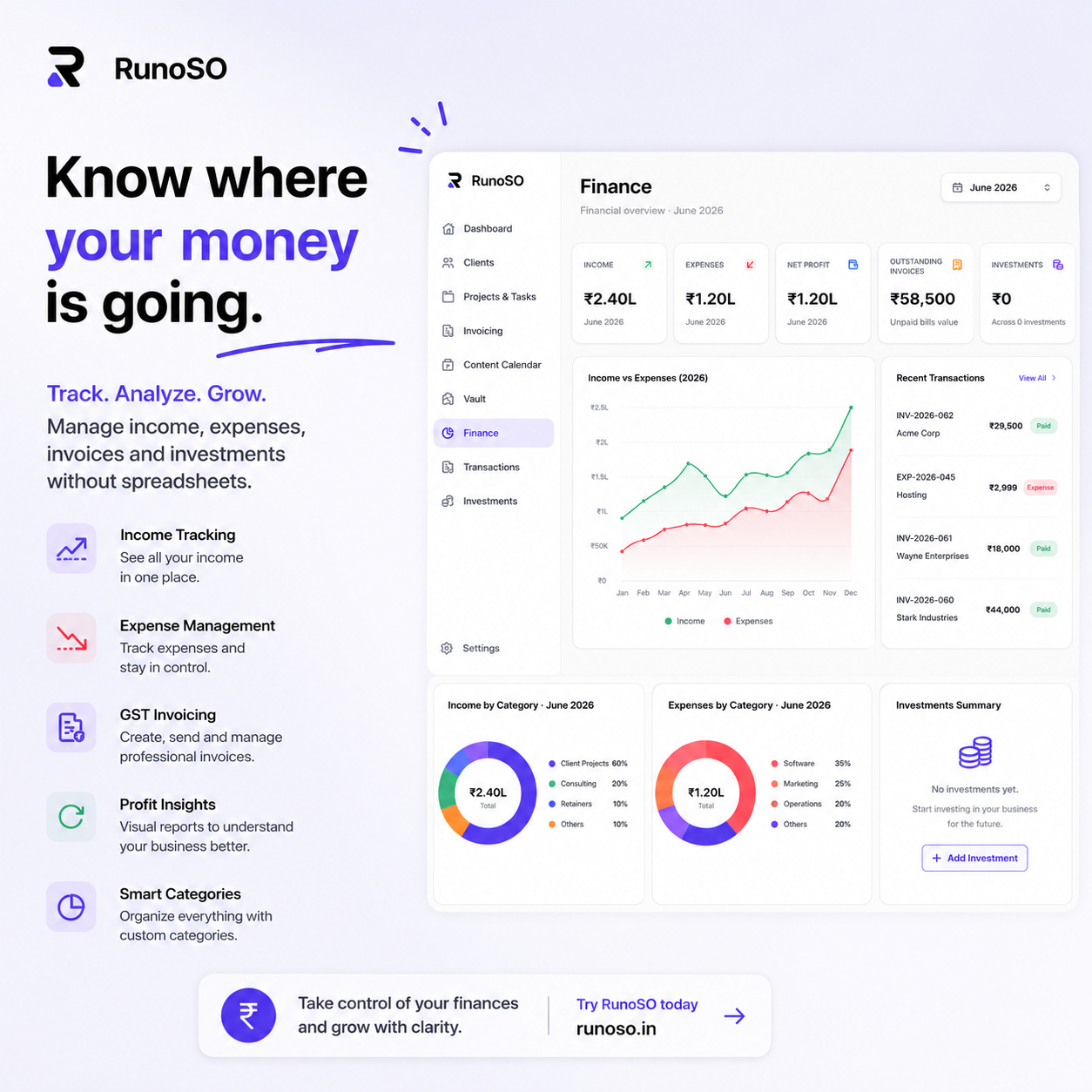
RunoSO's Finance module lets me log income and expenses with categories, dates, and linked clients/projects. I can see my monthly cash flow at a glance, with charts powered by Recharts that actually make the data readable.
Invoices
This is where I went deep. As an Indian freelancer, I deal with:
- GSTIN and PAN on every invoice header.
- CGST/SGST/IGST tax splits depending on the client's state.
- SAC/HSN codes for service classification.
RunoSO generates professional PDF invoices with all of this baked in. I fill in the line items, select the client, and hit export. The system pulls my business details from Settings, calculates taxes, and generates a clean PDF using jsPDF + html2canvas.
Time to create an invoice: Before = 35 minutes. After = 90 seconds.
Investments
I also added a simple investment tracker for stocks, SIPs, crypto, and fixed deposits. As a solo founder, your business finances and personal finances are deeply intertwined. Having visibility into both in the same dashboard saves me from context-switching to yet another app.
Phase 4: The Vault — Security That's Not an Afterthought
Let me be honest about something embarrassing. Before I built the Vault, I stored client server credentials in:
- Plain text files on my Desktop.
- Notion pages with "hidden" blocks (not encrypted — just collapsed).
- iMessage threads with myself.
If any of those had been compromised, I'd have been handing over root access to a dozen client servers.
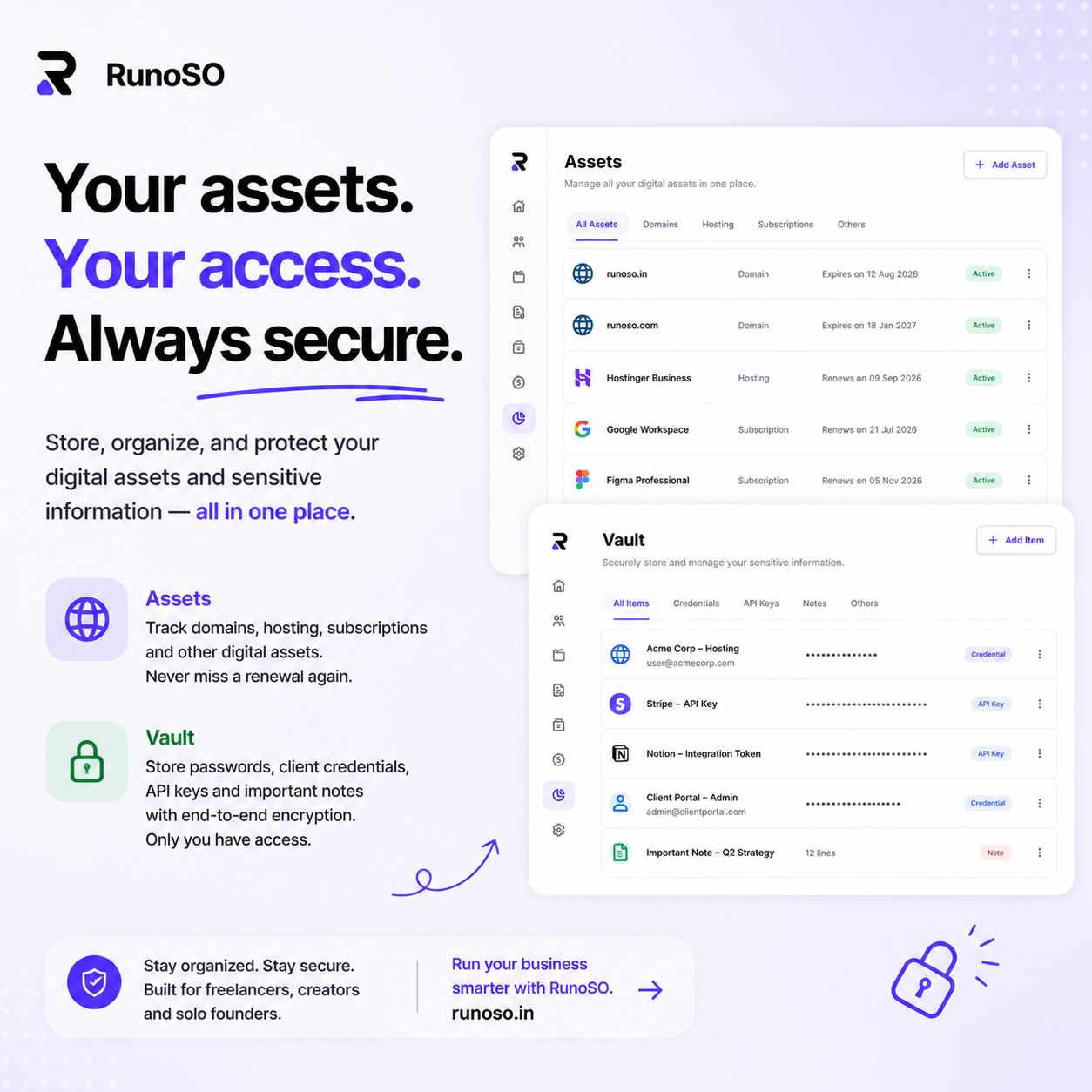
The RunoSO Vault uses AES-256 encryption via CryptoJS. Here's how it works:
- When I save a credential, it's encrypted on the server using a master key stored in environment variables.
- The encrypted ciphertext is stored in the database. Even if someone dumps the database, they get gibberish.
- Decryption only happens server-side when I request it — the master key never touches the frontend.
I can organize vault items by category (Passwords, Servers, API Keys, Other) and link them to specific clients and projects. When I'm on a client's page, I can see all their credentials in context.
This single feature gave me more peace of mind than any other part of the system.
Phase 5: Digital Assets — The Control Room
As my business grew, so did the number of digital assets I managed:
- 15+ domains across GoDaddy, Namecheap, and Cloudflare.
- 4 hosting servers (DigitalOcean, Hetzner, AWS).
- 20+ GitHub repositories.
- Multiple social media accounts for myself and clients.
- A dozen SaaS subscriptions with different billing cycles.
Before RunoSO, I'd discover a domain had expired when a client's site went down. I'd realize I was paying for a SaaS tool I hadn't used in three months only when I checked my bank statement.
The Digital Asset Manager gives me a single view of:
| Asset Type | What I Track |
|---|---|
| Domains | Registrar, expiry, DNS, auto-renewal |
| Hosting | Provider, IP, plan, cost, renewal |
| Cloudflare | Zone configs linked to domains |
| GitHub | Repos, tech stack, visibility |
| Social | Handles, followers, linked credentials |
| Subscriptions | Tools, cost, billing cycle, renewal |
I check this page once a week. It takes 5 minutes. Zero surprises.
Phase 6: Content Pipeline — Shipping Consistently
The last major module I built was the Content Pipeline. As a solo founder, content marketing is critical but chronically neglected. I'd have great ideas in the shower and forget them by lunch.
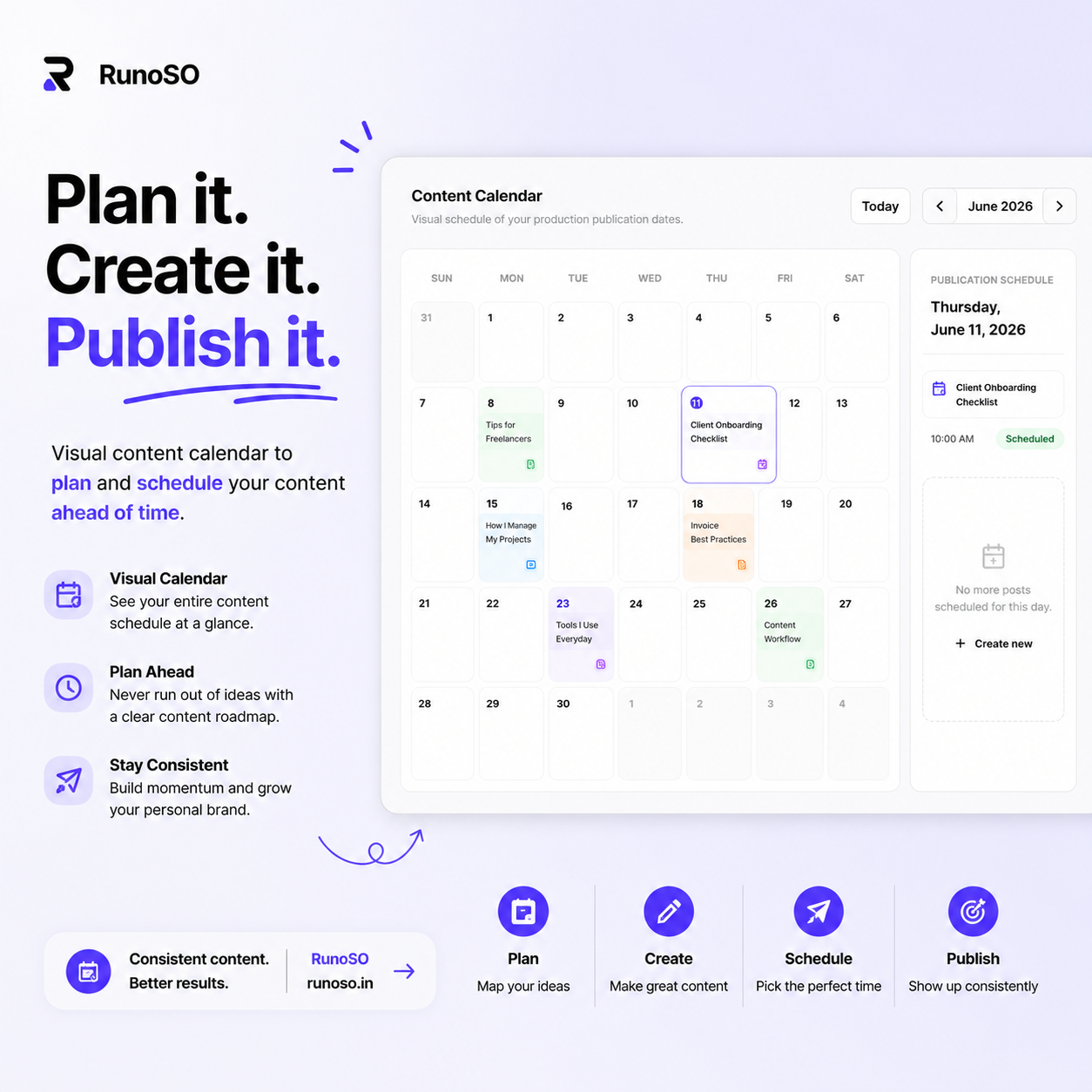
The Content Pipeline has three components:
- Content Ideas: A capture board for raw ideas. Quick title, brief description, done.
- Content Board: A Kanban view where ideas progress through stages: Idea → Script → Production → Editing → Published.
- Content Calendar: A visual calendar for scheduling publish dates.
This blog post you're reading right now? It went through this exact pipeline.
The Compound Effect
Here's what happens when all six systems live in the same product:
- I create a client → their project auto-links → I create tasks for the project → when the work is done, I generate an invoice → the payment shows up in transactions → the client's credentials are in the vault → their domain is in the asset manager.
Every piece of data enriches every other piece. That's the compounding system. It gets more valuable the more I use it.
After six months:
- Admin overhead dropped from ~20 hrs/month to ~4 hrs/month.
- Zero missed renewals.
- Zero credential security incidents.
- Invoice turnaround from days to minutes.
- Content publishing consistency up from 1 post/month to 4+.
The Blueprint (TL;DR)
If you're a developer thinking about going solo, here's my advice:
- Map your workflows before you pick tools. Understand the connections between clients, projects, finance, and operations.
- Consolidate ruthlessly. Every additional tool is a context switch tax. Every login is friction.
- Automate the boring parts. Invoice generation, credential storage, asset tracking — these should take seconds, not minutes.
- Gamify your consistency. Task streaks, dashboards with real-time stats — these small feedback loops compound over months.
- Security is not optional. If you're storing client data, encrypt it properly. No more plaintext credential files.
RunoSO is now available for solo operators who want the same system without building it from scratch.
This is Part 2 of my "Build in Public" series. If you're a developer building your own tools, I'd love to hear about it — reach out on X.
Keep Reading
- Next: see how we structured the 26-table SaaS database behind this system.
- Start with why I ditched scattered tools — the origin story.
- Compare pricing plans — Free, Solo ₹169 and Pro ₹399.